My Honest Hunt for the Best LELink OBD2 App
Let me tell you a story about a little yellow dashboard light. You know the exact one. It ruins your whole day in an instant. I was driving down Interstate 35 in Texas. The harsh summer sun was baking the roof of my car. My kid was fast asleep in the back seat. We were just enjoying a quiet, peaceful road trip to see family.
Then a loud chime broke the silence. The check engine light popped up and stared at me. My stomach sank straight to the floor. Pulling over to the side of the road, I felt my heart race. The smell of hot dust and asphalt drifted through the vents. My hands gripped the steering wheel tightly with stress. I truly hate unexpected car problems. They always cost too much money. They also eat up your precious weekend time.
But I had a backup plan ready. Reaching into my glove box, I pulled out my tiny wireless scanner. Now I just needed to find the right LELink OBD2 app to make the gadget work.
Leaving My Old Clunky Tools Behind
Before finding this tiny device, I owned a giant orange car scanner. It looked exactly like a heavy plastic brick. The tool had a tiny gray screen with dull black letters. You could barely read the text in the bright sun.
Using that old machine was a complete nightmare. It featured stiff rubber buttons that literally hurt my thumbs. Booting up and linking to the car took five long minutes. Then, it only gave me a weird, useless code number. It never told me what the code actually meant in plain English. I always had to go inside, open my laptop, and search the web for hours.
Craving something better, I started looking for modern options online. I wanted a tool that used my vivid phone screen instead. Our daily phones are incredibly bright and fast. It made perfect sense to use that computing power for my car. Upgrading to a smart Bluetooth scanner changed my life. The jump in tech quality is absolutely huge.
Why I Bought This Specific Adapter
I love fixing simple things around the house. Tinkering with broken microwaves and air fryers is my favorite hobby. But modern cars are totally different beasts. They are basically giant, rolling computers on wheels. You cannot just look under the metal hood and guess the problem anymore. Fixing them requires a digital tool to talk to the main computer.
A trusted friend told me about the LELink adapter recently. He said it was super fast and very reliable. Trusting his advice, I bought one online that same night. The hardware itself is genuinely great. It is a small, black plug that hides out of sight. The device uses Bluetooth Low Energy technology. This means it uses almost zero battery power. You can leave it plugged in forever without killing your car battery.
But having good hardware is only half the battle. The real magic happens inside the software. You must have a solid app on your phone to read the hidden data. This exact step is where my highway headache started.
The Great App Confusion
Sitting in my sweltering car, I felt totally stuck. I opened the app store on my phone to find a solution. Typing the scanner name gave me a huge list of confusing choices. I felt completely lost and annoyed.
First, I downloaded a free program called LELink Config. Thinking this was the main tool, I felt a rush of relief. I quickly paired the adapter with my phone. Tapping the screen did absolutely nothing to help my car. The screen just showed boring system settings for the device itself. I felt so foolish sitting there. Wasting ten hot minutes on the side of the road made me angry.
It turns out that the specific app is just for the initial setup. It does not read engine codes or clear dashboard lights at all. Finding the actual diagnostic software takes a bit more digging.
Comparing My Top Software Choices
I started searching for third-party car apps immediately. The adapter luckily works with many different popular programs. Reading tons of user reviews helped me figure out what to download. Here is a quick look at the best options I found during my panic.
| App Name | Cost | Best Feature | My Rating |
| Engine Link | Paid | Clean custom dashboard gauges | 4 out of 5 |
| OBD Fusion | Paid | Huge amounts of deep engine data | 5 out of 5 |
| LELink Scanner | Free | Simple and fast code reading | 3 out of 5 |
| Car Scanner ELM | Free Version | Very easy to use menu screens | 4 out of 5 |
I needed something incredibly fast and reliable right then. Planning to test a few of them over the next few weeks sounded fun. But for that stressful day on the highway, I needed instant answers.
Trying Out Engine Link First
I downloaded the Engine Link app first to save time. It cost a few bucks, but I was feeling desperate. The small file download finished in just a few seconds.
Plugging the scanner into the port under my steering wheel was tricky. I bumped my head hard on the thick plastic dash. That clumsy mistake hurt quite a bit. Rubbing my sore head, I grabbed my phone to finish the job.
Connecting to the adapter was a bit weird at first. You do not go into your normal phone Bluetooth settings. You just open the downloaded app directly. Then you tap connect from inside the main app menu. This happens because the gadget uses special low-energy signals.
Reading the Hidden Engine Data
The app connected to my car super fast. A bunch of bright green numbers popped up instantly. I clearly saw my engine speed and coolant heat levels. Watching the screen felt like playing a cool racing video game.
Tapping the button to check trouble codes made me nervous. A little spinning wheel showed up on the bright screen. My heart started beating much faster. What expensive part was broken? How much money would a mechanic charge me?
The screen finally flashed a result. A short code popped up right in the middle. It clearly said P0456 in bold letters. The helper text below it said there was a small leak in the EVAP system. Taking a very deep breath, I started to smile.
The Easiest Car Fix Ever
I actually knew exactly what that specific code meant. Reading about it on a busy car forum years ago helped me remember. It almost always points to a loose gas cap.
Stepping out of the car felt absolutely brutal. The Texas heat hit my face like a solid brick wall. Walking around to the gas tank, I wiped heavy sweat from my eyes. I opened the little painted fuel door. Grabbing the plastic gas cap, I gave it a firm twist. It was completely loose and barely hanging on. I must have forgotten to tighten it at the morning gas stop.
Twisting it until it clicked three loud times fixed the problem. That simple action was all it took. Getting back in the car felt amazing. The cool air from the AC blasted my face.
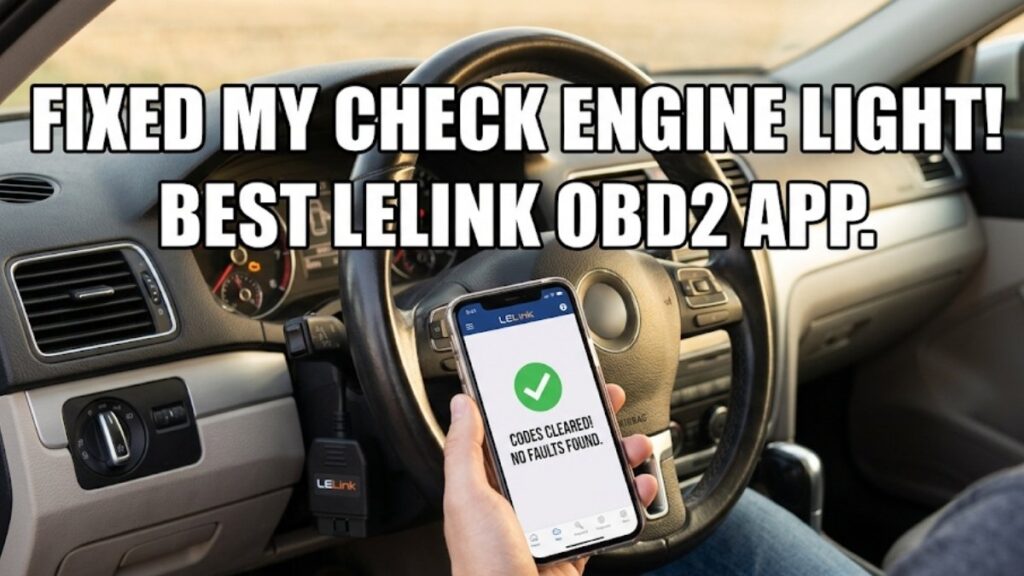
Picking up my phone, I tapped the clear codes button on the app screen. The dashboard beeped one more time. The annoying yellow check engine light finally went out completely. A massive wave of relief washed over my tired body. Smiling at my sleeping kid in the rearview mirror, I put the car in drive. We were completely safe to hit the road again.
Exploring OBD Fusion Later On
That scary highway trip taught me a very valuable lesson. I clearly needed to learn more about how my car works. A few weeks later, I bought another premium app called OBD Fusion. Many car guys say it is the ultimate LELink OBD2 app on the market today.
Testing it out myself makes me fully agree with them. This piece of software is an absolute monster. It gives you so much deep data about your engine health. Checking your live fuel trims is super easy. Monitoring your battery voltage takes just one tap. Mine currently reads a healthy 12.6 volts when the car is turned off.
Setting Up Custom Warnings
One really neat feature in OBD Fusion is the custom alarms. Setting up special warnings keeps your car safe from disaster. I live in a place where summer days get dangerously hot. Car engines can overheat very quickly if you ignore them.
Creating an alarm for my engine coolant took two minutes. If the heat goes over a certain danger level, my phone beeps loudly. The whole screen flashes bright red to warn me instantly. This single feature alone is worth the small price of the app. Catching a heat spike early can save your motor from a total meltdown. You never get that kind of safety with a cheap plastic tool.
What I Truly Love About the Setup
Over the last few months, I have used this setup constantly. Testing it heavily gave me some very strong opinions. I really want to share the good and the bad realities with you.
First, let us talk about the good stuff. The connection speed is truly amazing. Old-style scanners used to take forever to link up. This tiny adapter connects to my phone in literally two seconds. The wireless Bluetooth connection never drops or lags while driving.
Freedom to choose your own layout is another massive plus. If an app runs poorly, you can just delete it forever. Nobody is stuck suffering with clunky, bad software. Switching between different tracking apps is very fast and easy.
Saving Real Cash at the Shop
The absolute biggest win is the actual money I save. Local mechanics charge a heavy premium just to look at your car. They plug in their own scanner and hand you a bill for one hundred dollars.
Now I can read the secret engine codes totally free. If the issue is a loose gas cap, I fix it in seconds. Finding a bad sensor means I can just order the cheap part online. Doing the work myself gives me power over my own vehicle. It keeps my hard-earned money right in my wallet.
Where Things Go Wrong
It is not all perfectly smooth sailing, though. Running into some real headaches is part of the digital process.
The most annoying problem is the early setup phase. It heavily confuses a lot of first-time buyers. Seeing frustrated people complain online happens all the time. They naturally try to pair the device in their main phone settings. Doing it that way always fails and causes anger.
You must always remember the golden rule of BLE devices. Always connect through the specific app itself. The main phone settings menu will never work for this tool.
The Android Location Headache
I personally use an iPhone for my daily driving needs. My neighbor wanted to try the scanner on his Android phone recently. We ran into a very weird issue right in my driveway.
His phone app could not find the active scanner at all. Trying five different times made us want to give up completely. Then I remembered a strange technical trick from a forum post. Android systems oddly force you to turn on location services to use low-energy Bluetooth.
Turning on his phone’s GPS fixed the mystery issue immediately. The app found the scanner signal right away. Having to use GPS to check an engine is a baffling rule. It makes zero logical sense to most people. But you have to do it if you want the tool to work.
Tips for New DIY Users
If you want to try this setup yourself, I have some solid advice. Following these simple steps will save you hours of deep frustration.
- Buy the exact right adapter model. Look for the letters BLE on the cardboard box.
- Skip the annoying free apps at first. Pay a few bucks for a premium tool to totally avoid hidden pop-up ads.
- Never play with live data screens while actively driving on the highway.
- Always connect inside the app menus, and completely ignore your general phone settings.
- Turn on your location services if you use an Android phone to ensure a fast connection.
My Final Verdict on Car Tech
Dealing with sudden car problems is incredibly stressful for anyone. We all deeply hate that sinking feeling in our chest. Having the right tools in your glove box changes everything for the better.
Finding the absolute best LELink OBD2 app took some real trial and error. Hitting my head on the dashboard hurt a lot. Sitting in a baking hot car was miserable. Getting mad at a useless setup app wasted my time.
But that scary day on the Texas highway changed my whole view. Fixing my own car in five minutes made me feel like a genius mechanic. Saving our family’s road trip from a costly tow truck disaster felt amazing.
Anyone who likes fixing things absolutely needs this setup. It instantly turns your everyday phone into a powerful window into your engine. Just remember to check your gas cap before you panic. Tightening it might just save you a whole lot of unnecessary worry.
Frequently Asked Questions About the LELink Tool
| FAQ Topic | Core Benefit | Best Tool To Use |
| Tool Setup | Fast wireless pairing | LELink Adapter |
| App Choice | Deep engine data access | OBD Fusion App |
| Battery Drain | Safe for 2026 car models | Low Energy Tech |
Can I leave the scanner plugged in forever?
Yes, you can safely leave it plugged in. It uses low-energy tech that will not kill your car battery. Your device is totally fine in a hot garage all summer.
Why does my Android need map rules turned on?
Smartphones group low-power tech with map rules. You must turn your GPS on to use any good LELink app. This simple trick helps your new car tool pair very fast.
How do I link my phone to the new gadget?
Do not use the main phone settings menu at all. You must plug the small tool into your car port first. Then open your fresh LELink app to link up right away.
What is the best software for this car tool?
You have many top choices for a great LELink app today. The OBD Fusion tool gives deep facts for pro fixes. Engine Link shows clear dials for a fast shop test.
Can this scanner clear my check engine light?
Yes, any good LELink OBD2 app will clear those bad dash lights. It pulls the fault code so you know the exact flaw. Then you clear it with one tap to save cash.