Microwave Plate Not Turning: Causes, Troubleshooting, and Easy Fixes
I noticed my microwave plate not turning during a freezing January night in Ohio. One side of my leftover mac and cheese came out bubbling hot while the middle stayed cold. That tiny spinning tray matters more than most people think.
I have dealt with old Whirlpool and GE microwaves in humid Florida kitchens and dry Arizona garages, and the same problem keeps showing up. A worn turntable motor, cracked coupler, or dirty roller ring can stop the glass plate fast. In this guide, I will show you the common causes, simple troubleshooting steps, and safe fixes that actually work in real homes.
Why Your Microwave Plate Stopped Turning
A microwave that suddenly goes silent underneath the glass tray can feel weirdly dramatic. I noticed mine during a rainy Tuesday night in Ohio when one side of my leftover pizza came out lava-hot while the other stayed cold.
How the Microwave Turntable Works
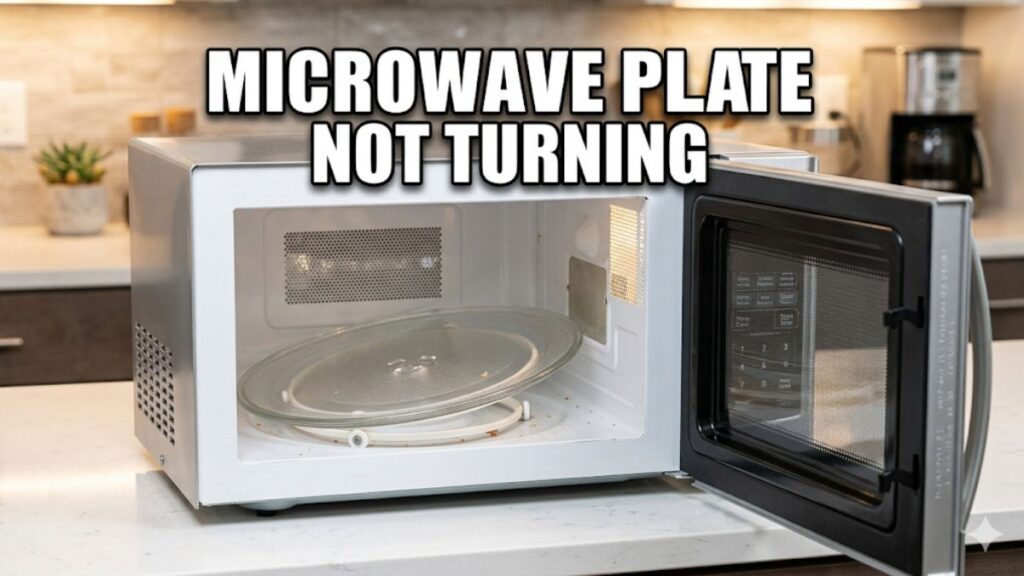
Your microwave turntable system has a few small parts that work together every time you heat food. If one piece slips, cracks, or jams, the microwave plate may stop spinning completely.
Glass Plate
The glass tray holds the food and rotates during cooking. Most plates use heat-resistant tempered glass for durability and even heating.
Turntable Coupler
The coupler is the small plastic piece under the tray. It connects the turntable motor to the glass plate and helps transfer rotation power.
Roller Guide Ring
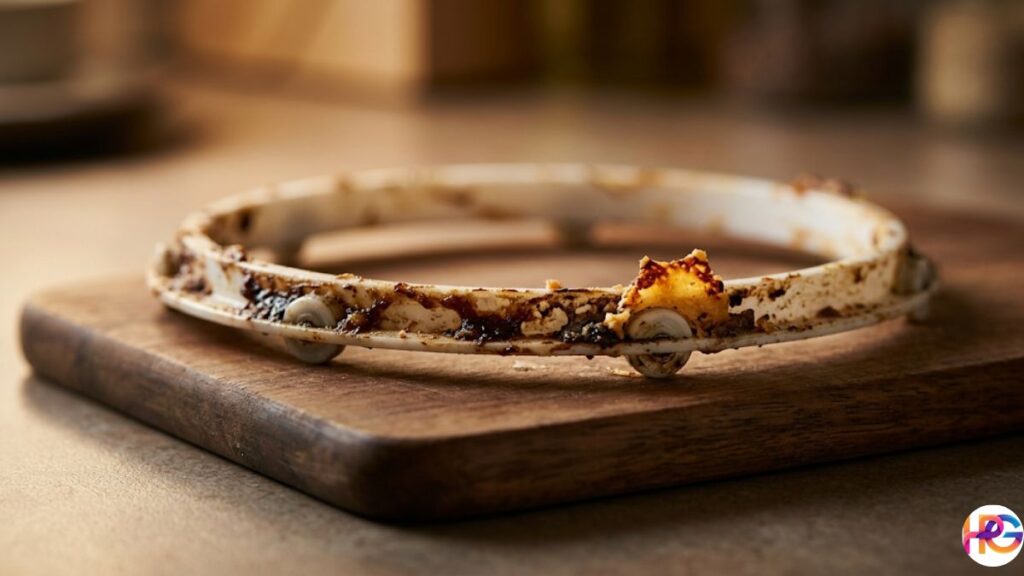
This circular ring sits under the plate and uses tiny wheels to keep the tray moving smoothly. Grease, crumbs, or warped wheels can block movement.
Turntable Motor
The motor sits underneath the microwave floor. It creates the slow spinning motion that helps food heat evenly without hot or cold spots.
Drive Shaft Underneath the Tray
The drive shaft connects the motor to the coupler. If it wears down or slips out of place, the microwave turntable may stop rotating.
Signs Your Microwave Turntable Is Failing
A failing microwave turntable usually gives warning signs before it stops completely. I once heard a faint clicking sound for days before my tray finally froze in place during movie night.
Microwave Plate Not Spinning
The most obvious sign is a tray that stays still while the microwave runs.
Jerky or Uneven Rotation
The plate may start, stop, or wobble while turning. This often points to a worn roller guide or damaged coupler.
Grinding or Clicking Noises
Grinding sounds usually come from debris, damaged wheels, or a failing motor underneath the microwave cavity.
Plate Slipping Off the Track
A loose or misaligned roller ring can cause the tray to slide or jump during rotation.
Microwave Heats Unevenly
Food may come out scorching hot on one side and cold on the other. Uneven heating is common when the microwave plate is not turning.
Burning Smell From Underneath
A burnt plastic or electrical smell may signal a failing turntable motor or overheating internal parts.
Is It Dangerous If the Microwave Is Not Spinning?
A microwave can still heat food when the plate stops turning, but results are usually uneven. I had to stir soup every thirty seconds once because the bowl kept developing one boiling edge and one cold side.
Uneven Heating Can Leave Cold Spots in Food
Cold spots can be risky with leftovers, meat, or frozen meals because some areas may not reach a safe temperature.
Food May Overcook on One Side
Without rotation, microwave energy focuses on certain spots for too long. This can dry out pasta, rice, or leftovers quickly.
Usually Safe for Short-Term Use, but Not Ideal
You can still use most microwaves temporarily if the turntable stops working. Rotate the dish by hand halfway through heating for better results.
Some Flatbed Microwaves Work Without Turntables by Design
Newer flatbed microwave models use different heating systems and do not need spinning trays at all.
Most Common Causes of a Microwave Plate Not Turning
Sometimes the problem is tiny. A greasy crumb stuck under the roller ring once stopped my microwave from spinning completely. I spent twenty minutes assuming the motor was dead. It was just a piece of old burnt cheese. Finding the real reason your microwave plate is not turning is usually pretty easy. Let us look at the top culprits.
Dirty or Misaligned Roller Ring
This is the most common issue. Food spills harden over time. A sticky splash of soup can glue the wheels down fast.
- Food debris blocking wheels: Crumbs and grease stop the tiny plastic wheels from rolling. I always clean mine with plain white vinegar and a little baking soda. It cuts the tough grime without using harsh chemicals.
- Roller ring sitting off-track: If you bumped the plate hard, the ring might just be crooked under the glass.
- Warped guide wheels: Heat can melt or warp cheap plastic wheels over time. They lose their round shape and start to drag.
Broken Drive Coupler
The coupler is the small plastic piece under the tray. It connects the motor to the glass plate so it can spin.
- Plastic coupler cracks over time: I pulled out my old GE coupler during a hot, humid afternoon in Texas. It crumbled right in my hand. Plastic gets weak and brittle from the constant heat.
- Motor spins but tray stays still: You will hear the normal humming sound. The motor works fine. But the broken coupler cannot grip the plate to turn it.
- Common in older Whirlpool and GE microwaves: Many units built before 2026 use these standard plastic parts. They just wear out fast with daily use.
Faulty Turntable Motor
If the tracks and coupler look good, the motor might be dead. This feels a bit scary, but it is actually a fun DIY fix.
- Motor hums but does not rotate: It sounds like it wants to spin. But it lacks the power to push the heavy glass tray.
- Complete silence from underneath: You push start, and you hear the main fan running. But the bottom area stays totally quiet.
- Burnt motor smell: I really hate this smell. A dying motor often gives off a sharp, bitter scent of melting wire. If you smell this, unplug the cord fast.
Damaged Glass Tray
Your glass plate must fit perfectly to turn smoothly.
- Cracks or uneven weight distribution: A small crack can throw the whole tray off balance. It will rub against the floor and stall out.
- Wrong replacement plate size: Do not just buy any cheap plate online. A bad fit means the plate will slide around.
- Whirlpool microwave replacement plate compatibility issues: Whirlpool trays often have very specific center grooves. If those grooves do not lock firmly into the coupler, the plate will not turn.
Turntable Feature Accidentally Disabled
Do not laugh, but this happens all the time. It is a wild feeling when you realize you just pushed the wrong button and panicked for nothing.
- Some models have a turntable ON/OFF button: Many large built-in units let you stop the spin. This helps when you use a large rectangular dish that might hit the walls.
- Resetting the microwave may restore rotation: Someone in the house might have bumped the keypad. Just check your settings. You can also try unplugging the microwave for a minute to reset the computer board.
Easy Troubleshooting Steps You Can Try at Home
I always test microwaves with a mug of water first. It feels much safer. I do not want spaghetti sauce explosions on the ceiling again. I hate scrubbing hot red stains. It gets wild trying to clean that mess up. These simple steps help you find the problem fast.
Step 1: Unplug the Microwave
Safety always comes first. Pull the plug out of the wall. Do not just turn it off. Wait two to five minutes before you start. This lets the stored power drain away. You never want to risk a shock.
Step 2: Remove and Clean the Turntable Parts
Take out the glass plate and the roller ring. A friend once brought his broken Samsung microwave over to my house in 2026. The bottom floor felt thick, gross, and sticky. Wash the glass plate in the sink with warm soapy water. Wipe the roller guide and the flat cavity floor. Scrub away any stuck grease or hard crumbs. I love using white vinegar and baking soda to wipe the bottom clean naturally.
Step 3: Reinstall the Tray Correctly
Put the clean roller ring back inside. It must sit flat. Set the heavy glass plate right on top. Look at the small center grooves under the tray. Align those grooves tightly with the plastic coupler. Turn the plate gently by hand. Ensure the tiny wheels sit evenly on the track.
Step 4: Test the Microwave Rotation
Place your mug of water in the middle. Close the door tight. Heat the cup of water for thirty seconds. Watch the glass tray closely through the door. Check if the microwave turntable is turning smoothly. Listen for a nice smooth movement. If you hear no dragging, you fixed it!
Step 5: Reset the Microwave
If the tray still stalls, try a quick reset. Plug the unit back in firmly. Check your main house breaker box, too. One cold Friday night in Chicago, my kitchen went dark because of a tripped breaker. Check your control panel for a hidden reset button. Test your turntable settings to make sure the spin function is on.
How to Fix a Microwave Turntable Not Turning
Some fixes are very simple. You just need a kitchen table and a screwdriver. Other times, it feels like crawling into a tiny robot cave. It gets wild when you open up the bottom panel. Do not panic. I will show you exactly how to fix a microwave turntable not turning. You can do this safely.
Replace the Roller Guide Ring
This is a cheap and easy repair. You can usually find a new ring for under $15 online or at a local hardware store.
- Swap it easily: Just lift the glass plate and pull the old ring out.
- Listen to the sound: An old, warped ring makes a harsh scraping noise. A new ring glides silently.
I ordered a new ring on a quiet Sunday morning. It snapped right into place on the floor track. The smooth rolling sound felt so satisfying to hear.
Install a New Drive Coupler
You must remove the glass tray first. Grab the old coupler and pull it straight up. It usually pops right off the metal motor shaft.
- Match the model number carefully: Look inside your door frame. Find the exact brand and model numbers.
- Avoid generic loose-fitting parts: I bought a cheap generic coupler once for my old GE unit. It slipped constantly. The tray jerked around and spilled my coffee. Buy the correct part.
How to Test a Microwave Turntable Motor
This sounds tough, but it is actually fun. I always grab my digital multimeter for this job.
- Disconnect the power: Always unplug the heavy power cord first.
- Access the bottom panel: Flip the microwave over gently. Remove the small metal cover plate on the bottom.
- Use a multimeter to check continuity: Touch your meter probes to the motor terminals. You want to see a solid electrical reading.
- Look for burn marks or melted wires: Check the area closely. If you see melted plastic or smell a sharp burnt odor, the motor is definitely dead.
Replacing the Turntable Motor
This is a very common DIY repair. Most motors are incredibly inexpensive to buy. I swapped one out in early 2026 for a buddy.
- Unscrew the old motor: It usually takes just one or two small screws.
- Match RPM and voltage specifications: Read the small sticker on the old motor. Your new motor must match those exact numbers.
- Attach the wires: Slide the wire clips onto the new metal tabs. Screw the new motor into place.
When You Need Professional Repair
Sometimes, a DIY fix is just a bad idea. You must know when to walk away and call for help.
- Electrical burning smell: Heavy smoke smells mean deep internal wire damage.
- Microwave stops heating too: If your food stays ice cold and the tray stalls, the main computer board might be fried.
- Sparks or loud buzzing sounds: I saw bright blue sparks in my Denver kitchen once. It terrified me. I unplugged the machine fast. Do not mess with high voltage if you see sparks.
Can You Still Use a Microwave If the Plate Is Not Spinning?
I tried this once during a tense football game in Texas. I did not want to miss overtime, so I shoved a thick bowl of chili into the microwave and kept my eyes glued to the TV. But the plate was completely stuck. I had to pause my game, walk to the kitchen, and rotate the hot bowl myself. It was a wild rush. You can still use your microwave if the plate is not turning, but it takes extra work.
Situations Where It Is Usually Fine
Sometimes a broken turntable is not a huge deal. You can get by for a few days.
- Reheating drinks: A quick mug of cold coffee heats up just fine. You just need warm liquid.
- Small food portions: A single dinner roll or a hot dog works well. The microwaves cover small items fast.
- Short heating cycles: Anything under sixty seconds is usually safe. Quick heat bursts do not need a spin.
Problems You May Notice
If you heat food for a long time, things get messy. I hate pulling out a ruined meal.
- Uneven cooking: One side gets boiling hot. The other side stays cold to the touch.
- Frozen centers: I tried heating a thick frozen burrito this way once. The edges burned my mouth. The very middle was still pure ice.
- Overheated edges: Soups and sauces will boil over on the sides. You will spend time scrubbing red stains off the walls.
Can a Microwave Work Without a Turntable?
This might surprise you. Yes, some microwaves can work perfectly this way.
- Yes, some flatbed models are designed that way: Modern flatbed microwaves hide a spinning antenna underneath the floor. The food stays completely still. The heat moves around the food instead.
- Traditional microwaves rely on rotating food for even heating: Standard models just shoot heat in straight lines. They absolutely need that spinning tray to cook things right.
Is It Worth Fixing an Older Microwave?
A seven-year-old microwave sits in a weird zone. You stare at online appliance sales at midnight. You wonder what to do. I sat in my dark kitchen in Michigan on a cold Tuesday night debating this exact thing. My old unit felt great, but the parts were wearing out. It gets wild trying to guess if a repair is truly worth the money. Let me break down the real costs for you.
Average Microwave Turntable Repair Costs
Fixing a microwave plate not turning is usually pretty cheap if you do it yourself.
- Roller ring: This is a very low-cost fix. You might pay ten bucks at most.
- Coupler replacement: This is an affordable DIY repair. A small plastic piece costs almost nothing.
- Motor replacement: This is a moderate repair cost. A new motor runs about twenty dollars online.
- Professional labor: Paying a pro to fix it costs way more than the parts. A simple trip charge can hit a hundred dollars fast. I always fix these tiny parts myself to save cash.
Is It Worth Fixing a 7-Year-Old Microwave?
It really depends on the overall condition of your unit.
- Consider heating performance and noise: Does it still heat soup fast? Does it sound loud or rattle? If it runs great, keep it.
- Built-in microwaves are often worth repairing: These huge units cost hundreds of dollars to replace. Fixing a small motor makes perfect sense.
- Cheap countertop models: A basic forty-dollar unit from the store is different. It may just be cheaper to replace it if the motor dies. I personally love durable metal appliances built for the long haul. I hate tossing good gear out.
What Is the Most Common Microwave Failure?
I have tested and fixed many home tools in 2026. A broken turntable is common, but other parts fail too.
- Door switch problems: The little plastic door latches snap off easily. The unit thinks the door is open and will not start.
- Turntable motor wear: Daily use just burns these tiny motors out over time.
- Blown fuse: I have swapped many blown ceramic fuses. A quick power surge can pop them instantly.
- Magnetron failure in older units: Older units lose their heating power. The main magnetron tube just gives up. If this big part dies, you should probably just buy a new microwave.
Tips to Prevent Microwave Turntable Problems
My old microwave in Florida hated big heavy dishes. Every holiday dinner sounded bad. The tiny plastic wheels begged for mercy. It was wild to hear them scrape the floor. A microwave plate not turning is a huge pain. But you can stop this problem very easily.
Avoid Overloading the Glass Plate
Heavy dishes strain the tiny motor fast.
- Heavy dishes strain the motor: Do not put massive glass pots inside. I tried to heat a huge bowl of soup once. The motor groaned in pure pain.
- Use microwave-safe cookware: Pick light bowls and plates. This keeps the spin nice and smooth.
Clean the Microwave Weekly
Grease is the true enemy of smooth rolling.
- Prevent grease buildup: Hard food stops the wheels from moving.
- Wipe under the roller ring: I clean the bottom floor every single Sunday. I use plain white vinegar and a little baking soda. It cuts the sticky yellow grease right off. It leaves a fresh, clean scent.
Use the Correct Replacement Parts
Do not buy cheap random gear. Pick tough parts built for the long haul.
- Match model number exactly: Look at your door sticker. Buy the exact part you need online.
- Choose compatible Whirlpool microwave replacement plate sizes: A bad fit causes jumping. The plate will slide off the track and spill your hot food.
Listen for Early Warning Sounds
Your microwave talks to you before it fully breaks. I learned this the hard way in late 2026.
- Clicking: A sharp tick means a tiny wheel is stuck.
- Dragging: The heavy glass plate might be off the center track.
- Slow rotation: The small motor is getting weak and tired.
- Grinding noises: A harsh grind means the plastic coupler is breaking. Fix these tiny sounds early before the whole tray stops.
FAQs About Microwave Turntables
People ask me these same questions often. A microwave plate not turning drives everyone wild. Let us clear up the top questions right now.
How do you fix a microwave turntable?
Start with the simplest parts first. Clean the roller ring in your sink. Feel the plastic for gross, sticky spots. Inspect the drive coupler for cracks. If those look good, test the small motor underneath. I fixed a loud one early in 2026 down in Georgia.
How to fix a microwave that does not rotate?
First, try a quick power reset. Unplug the thick wall cord for two minutes. Next, reinstall the heavy glass tray correctly. Make sure the tiny wheels sit perfectly flat. If the microwave plate is not turning still, replace the damaged parts.
Can I use my microwave if it is not spinning?
Yes, you can use it temporarily. I did this during a busy Friday lunch. You must rotate the food manually, though. Stop the timer halfway through. Turn your hot plate by hand. This gives you nice, even heating.
Is there a reset button on microwaves?
Some fancy models have a clear reset button. You can just push it fast. Most standard units do not have one. You just reset them by unplugging the main cord. Wait a few minutes. Plug it back in to reboot the computer board.
How much does it cost to fix a microwave turntable?
Minor DIY fixes are very inexpensive. A new ring or coupler costs under fifteen bucks. Motor replacement costs a bit more. If you hire a pro, labor costs get high fast. I always buy the cheap parts and do it myself.